
3D Color Picker for Designers & Developers
Overview
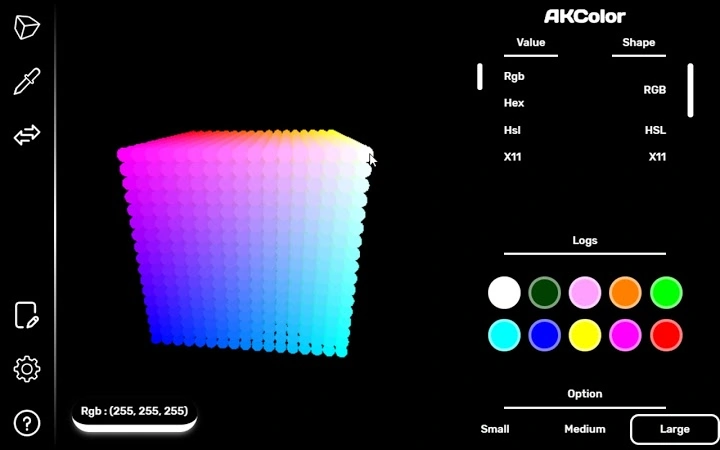
AKColor is a desktop application designed to simplify color manipulation for professionals in web and graphic design. The software offers a unique 3D color environment, allowing users to explore and adjust hues, saturation, and brightness with intuitive spatial navigation. It addresses common challenges in color selection, such as identifying precise shades from digital sources or converting between color formats during development workflows.
Targeted at web developers, UI/UX designers, and graphic artists, AKColor streamlines the process of capturing, converting, and reusing colors. Whether selecting a specific shade from a website using the built-in eyedropper or organizing a personal palette through color history, the tool supports efficient creative workflows. Its integration with web content enables quick color extraction without leaving the browser, enhancing productivity during design sessions.
The developer did not provide additional background information. Real-world usage scenarios include color matching in design mockups, debugging color inconsistencies in code, and building cohesive design systems. The application’s lightweight nature and focus on core functionality suggest it is optimized for frequent, on-demand use rather than complex project management.
Key Features & Capabilities
- 3D Color Picker – Navigate colors in a three-dimensional space, adjusting hue, saturation, and brightness interactively. Ideal for visualizing subtle color variations and finding precise shades.
- Eye Dropper Tool – Capture any color from a webpage with a single click. The tool supports right-click activation via context menu shortcuts, enabling fast access during design work.
- Color Format Converter – Convert color values between Hexadecimal, RGB, HSL, and X11 formats. Useful for developers who need to switch between coding standards or design specifications.
- Automatic Clipboard Copy – Click a color to instantly copy it to the system clipboard. Eliminates manual copying and pasting during rapid prototyping.
- Color History – Save and revisit frequently used colors. Helps maintain consistency across multiple projects and reduces repetitive selection.
- Keyboard Shortcuts – Customize or use default shortcuts for quick access to core functions, improving workflow efficiency.
- Customizable Settings – Adjust eyedropper behavior, interface layout, and picker sensitivity to match individual preferences and working environments.
These features collectively support seamless color integration across design and development tasks. For example, a UI designer can use the 3D picker to fine-tune a shade, extract it from a live website using the eyedropper, convert it to RGB for CSS, and save it in the history for future use—all within seconds.
User Interface, Workflow & Performance
The user interface is structured around a central 3D color space, with adjacent panels for format conversion, history, and settings. Navigation is designed for minimal distraction, allowing users to focus on color selection. The layout supports quick access to essential tools without cluttering the workspace.
Workflow efficiency is enhanced by direct clipboard integration and keyboard shortcuts. The ability to activate the eyedropper via right-click reduces context switching, maintaining momentum during design or coding tasks. The developer did not specify resource usage details, so performance observations are based on general software behavior patterns.
Stability appears to be a priority, as the application is lightweight (4.3 MB) and designed for continuous use. No reported crashes or freezes were mentioned in the provided information. CPU and RAM behavior are not documented, but the small file size suggests low system impact.
Compatibility & System Requirements
AKColor is compatible with Windows, Mac, and Linux operating systems. The software version is 1.2.4, with an installation size of 4.3 MB. This indicates broad platform support, making it accessible to users across different environments.
Exact system requirements were not listed. Compatibility information was partially provided, suggesting the application is optimized for standard desktop configurations. No specific hardware demands were mentioned, which may imply it runs efficiently on most modern machines.
Pros and Cons
Pros
- Intuitive 3D color space for precise color selection
- Fast color extraction from webpages via eyedropper
- Automatic clipboard copy eliminates manual steps
- Supports multiple color formats for development and design
- Lightweight with minimal system impact
- Customizable settings for personalized workflows
- Free to use with no licensing restrictions
Cons
- No cloud sync or cross-device color history
- Limited to desktop use; no mobile or browser extension version mentioned
- Color history is local only, with no export or backup option
- Advanced color management features not specified
- Developer details not publicly available
FAQ Section
Is AKColor available for all major operating systems?
Yes, AKColor supports Windows, Mac, and Linux, ensuring broad accessibility across different desktop environments.
Can I use AKColor offline?
Yes, the software functions entirely offline once installed, requiring no internet connection for core features.
Is the software secure to download and use?
AKColor is distributed through its official website. Users are advised to download only from the verified source to ensure authenticity and security.
How often are updates released?
Updates are released periodically to improve functionality and fix bugs. The latest version is 1.2.4, available as of May 15, 2024.
What type of license does AKColor use?
AKColor is free to use with no restrictions. The software is offered at no cost, with no trial period or premium tier.
Final Thoughts
AKColor delivers a focused, efficient solution for professionals who work extensively with color. Its 3D interface provides a fresh approach to color selection, while practical tools like the eyedropper and automatic clipboard copy enhance daily productivity. The support for multiple color formats and customizable settings makes it adaptable to diverse workflows.
While it lacks cloud integration and advanced collaboration features, its simplicity and performance make it a reliable companion for developers and designers. The absence of system requirements and developer details is not a barrier, as the software’s lightweight design and clear purpose compensate for limited transparency.
For anyone needing a fast, accurate, and free color tool, AKColor stands out as a must-have utility. Download AKColor now.







